KIVA’s WordPress Drafting delivers WordPress automation—taking content from creation to draft in one click.
WordPress Drafting, a KIVA feature, is part of KIVA by Wellows, an AI SEO Agent. It connects the KIVA editor to WordPress through secure REST API and application passwords, eliminating copy-paste errors and preserving SEO structure. This lets autonomous marketers send AI-generated, SEO-validated content directly into WordPress as editable drafts—ready for categories, tags, preview, and publishing when approved.
What Is WordPress Drafting?
KIVA WordPress Drafting is a post-generation workflow inside KIVA by Wellows that links your editor to WordPress CMS. Using secure REST API credentials, it pushes AI-optimized content straight to your WordPress dashboard as a draft—ensuring formatting, headings, and SEO scoring remain intact before final publishing.
In WordPress, “drafting” refers to the process of creating and saving a post or page without publishing it immediately. This allows you to refine your content over time, making revisions and adjustments before it goes live.
Key aspects of WordPress drafting include:
- Draft Status: New posts or pages are automatically saved as drafts, meaning they’re stored in your dashboard but not visible to visitors.
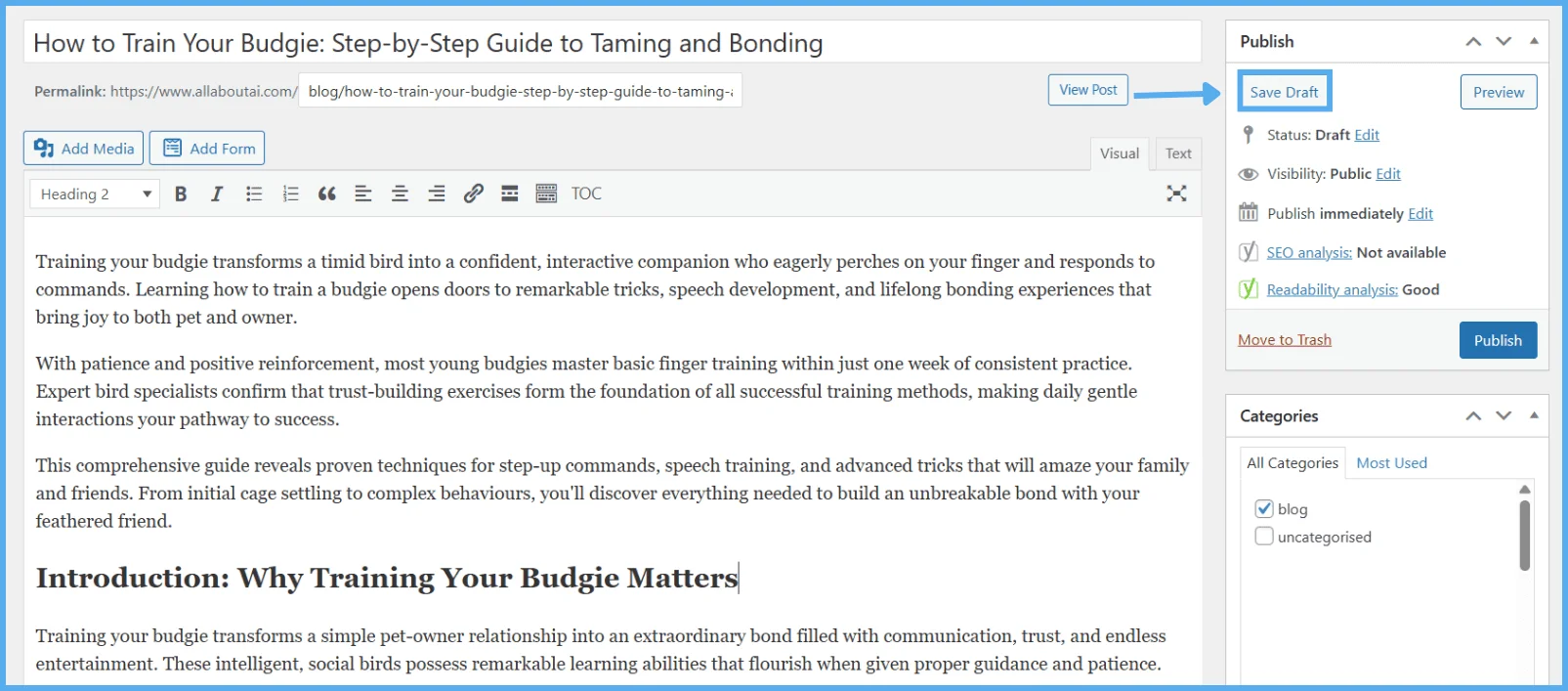
- Saving Drafts: You can manually click “Save Draft” at any time to preserve progress and prevent data loss during editing.
- Previewing Drafts: Drafts can be previewed before publishing, letting you check layout, formatting, and content presentation.
- Publishing or Scheduling Drafts: Once ready, drafts can be published immediately or scheduled to go live at a specific date and time—ideal for planned content releases.
Together, WordPress Drafting and KIVA integration streamline the publishing process: you get AI-powered drafts directly in WordPress while still benefiting from WordPress’s native features like saving, previewing, and scheduling content.
How KIVA’s WordPress Drafting Saves Time and Prevents Errors
KIVA by Wellows, an AI SEO Agent, includes WordPress Drafting to make handoffs seamless. It securely syncs content with WordPress CMS using REST API credentials and application passwords, ensuring smooth CMS integration while removing formatting mismatches, copy-paste errors, and extra editing steps.
- Reduce Tool Switching: Draft directly inside KIVA without moving to another platform.
- Preserve Structure: Maintain LLM-friendly formatting, SEO score, and metadata exactly as generated.
- Editable Drafts: Posts land in WordPress as drafts—ready for category tags, preview, and final edits.
- Secure CMS Sync: Uses WordPress REST API and application passwords for safe, authenticated integration.
With WordPress Drafting, KIVA by Wellows is not just your content generator—it’s your publishing engine, moving content from “written” to “drafted” without leaving your SEO stack.
How KIVA Publishes Content Directly to WordPress?
KIVA’s WordPress Drafting introduces seamless AI drafting, letting you move from LLM-generated content to a live post—without switching platforms. It uses secure WordPress integration to preserve your formatting, reduce manual copy-paste steps, and publish faster with peace of mind.
1. Generate Content and Initiate Drafting in KIVA
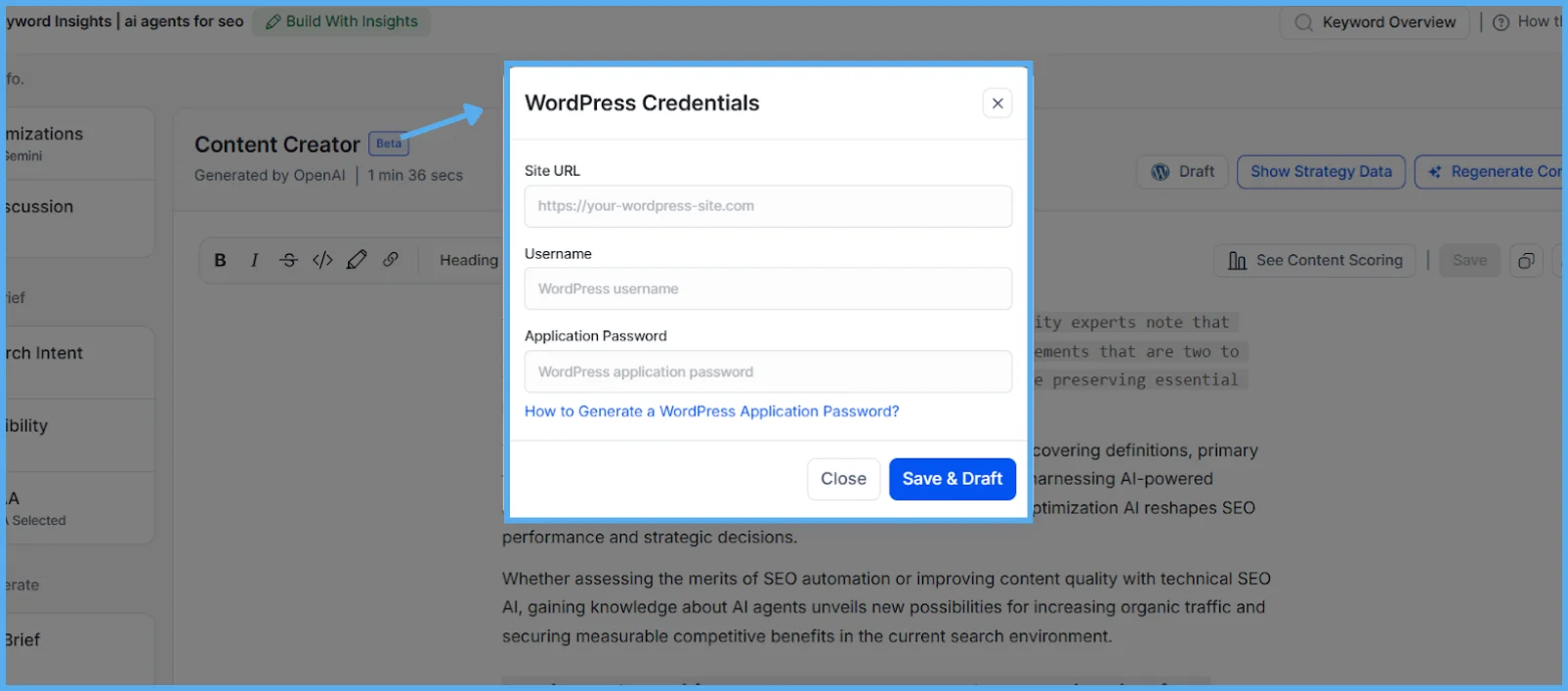
- After generating your article in KIVA’s Content Creator, click on the “Draft” button.
- Enter your WordPress site URL (e.g., https://yourdomain.com) when prompted.
- Continue with the setup to securely connect your WordPress account.
2. Generate a WordPress Application Password (For REST API Access)
This is necessary for KIVA to send content securely to your WordPress site.
1.Log into your WordPress Admin Panel
-
- Visit yourdomain.com/wp-admin
- Log in using an account that has admin access.
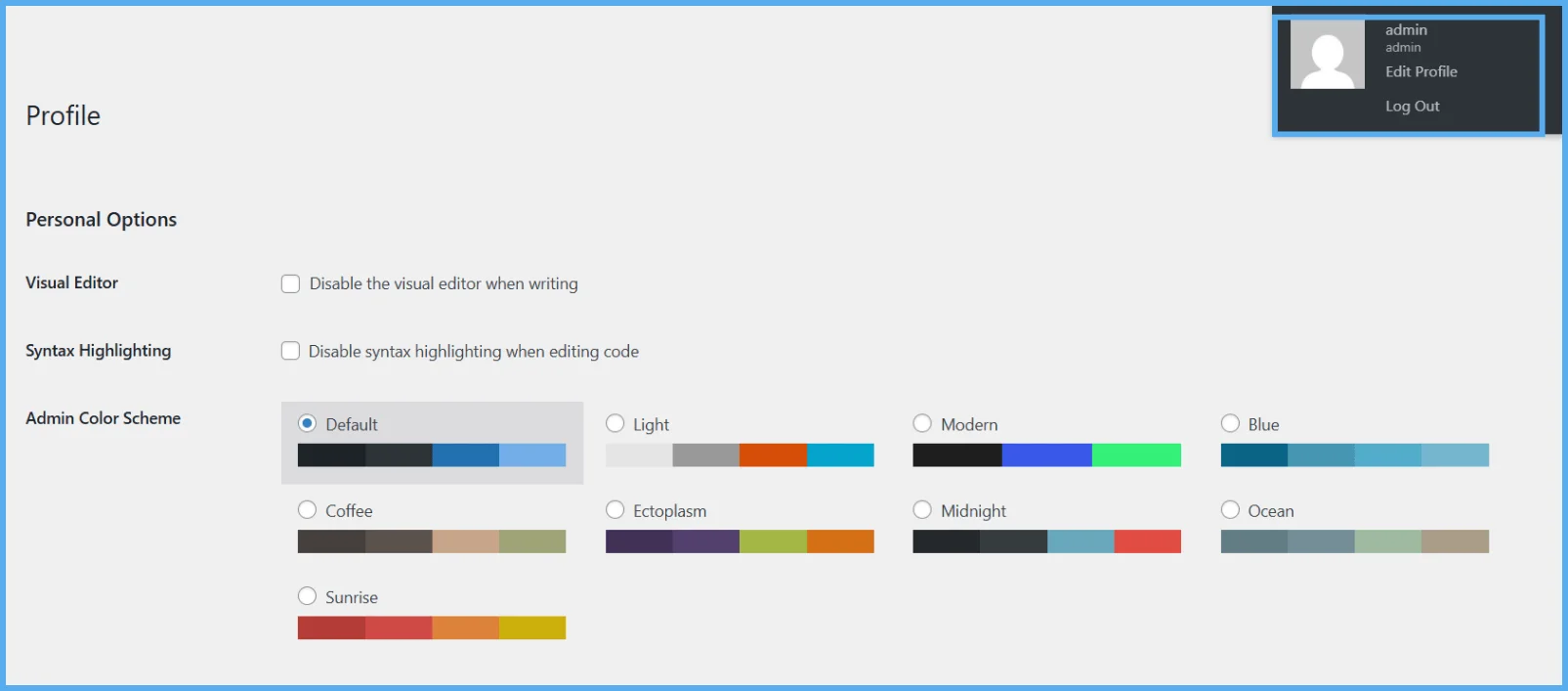
2. Access Profile Settings
-
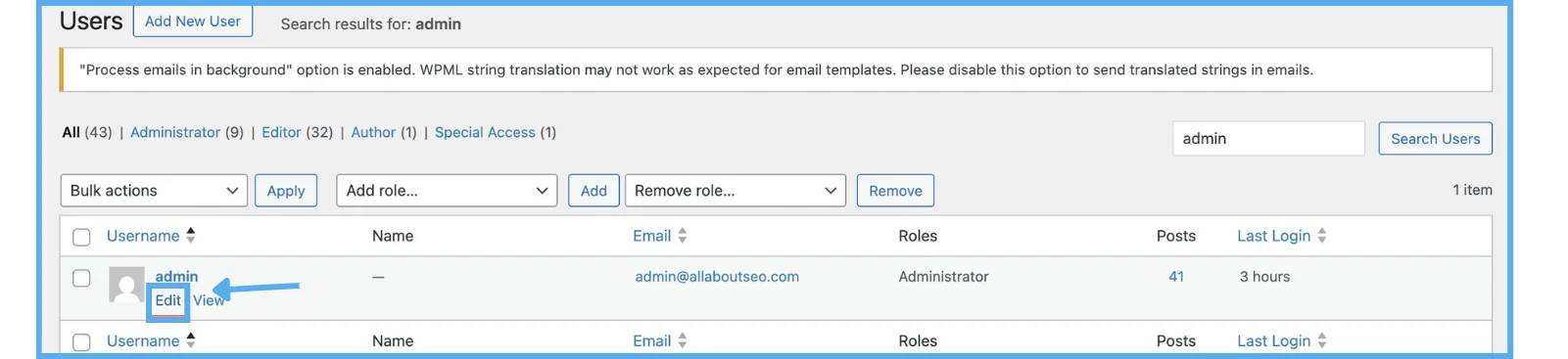
- Navigate to Users > Profile or Users > All Users, then click Edit under your admin account.
3.Create an Application Password
-
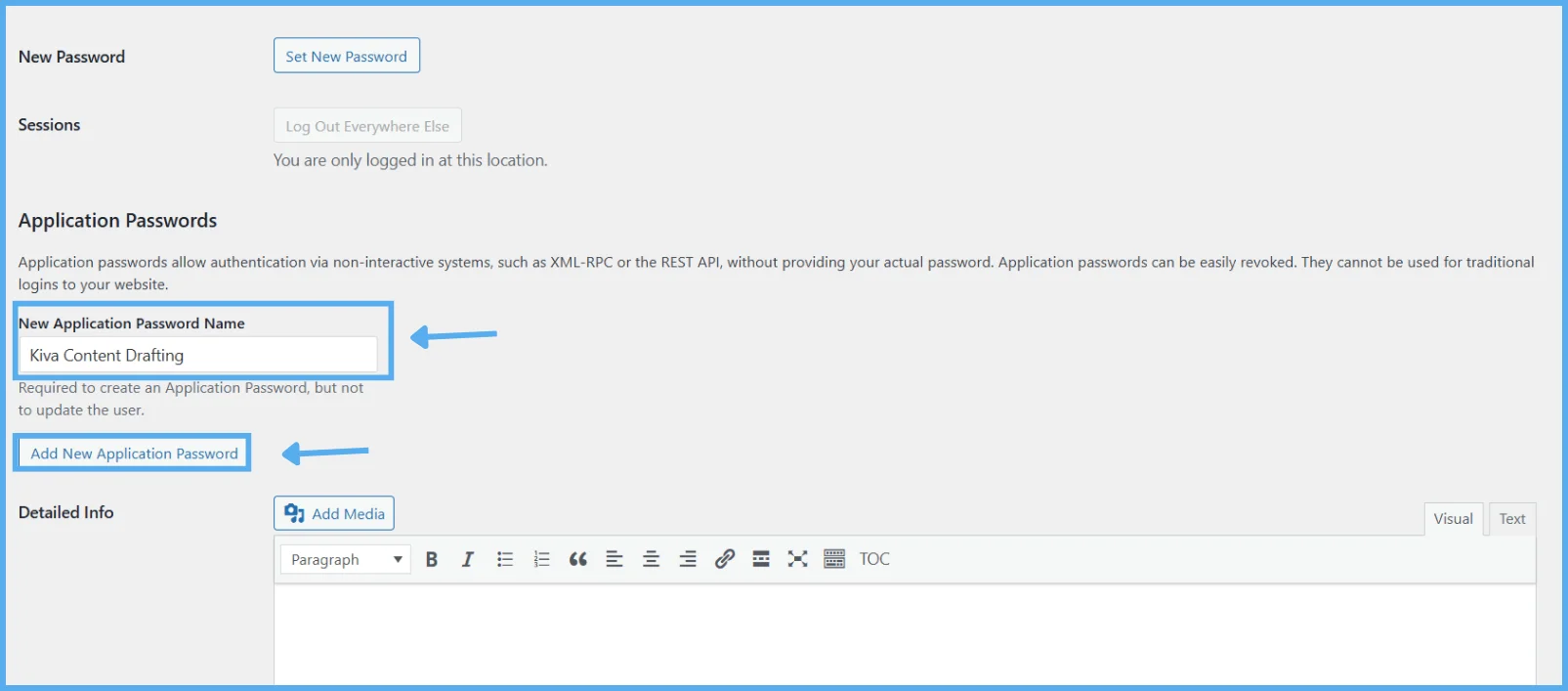
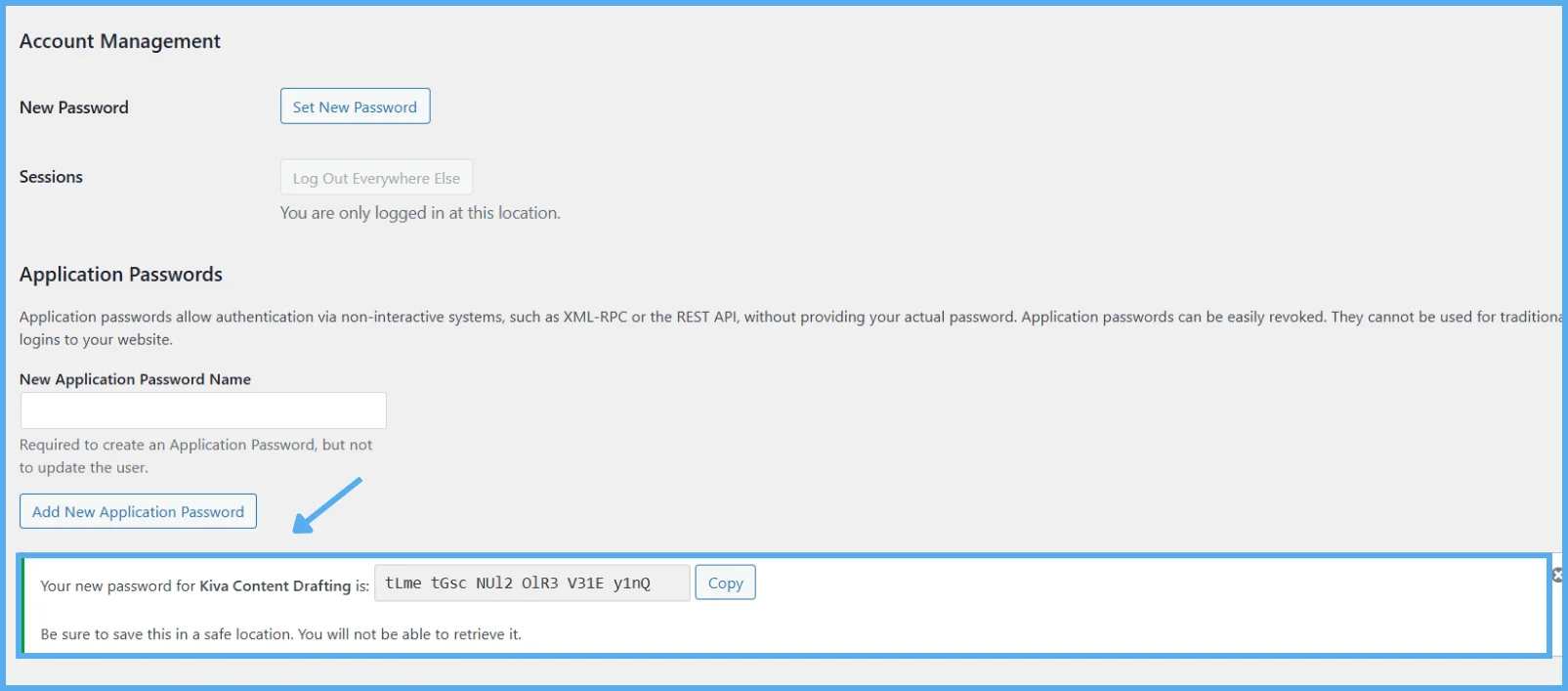
- Scroll down to the Application Passwords section near the bottom of the page.
- Enter the same username that you the profile username show (e.g., “KIVA Connection”).
- Click “Add New Application Password.”
4.Copy the Application Password Immediately
-
- WordPress will display the password only once.
- Copy and save it securely.
3. Add WordPress Credentials in KIVA
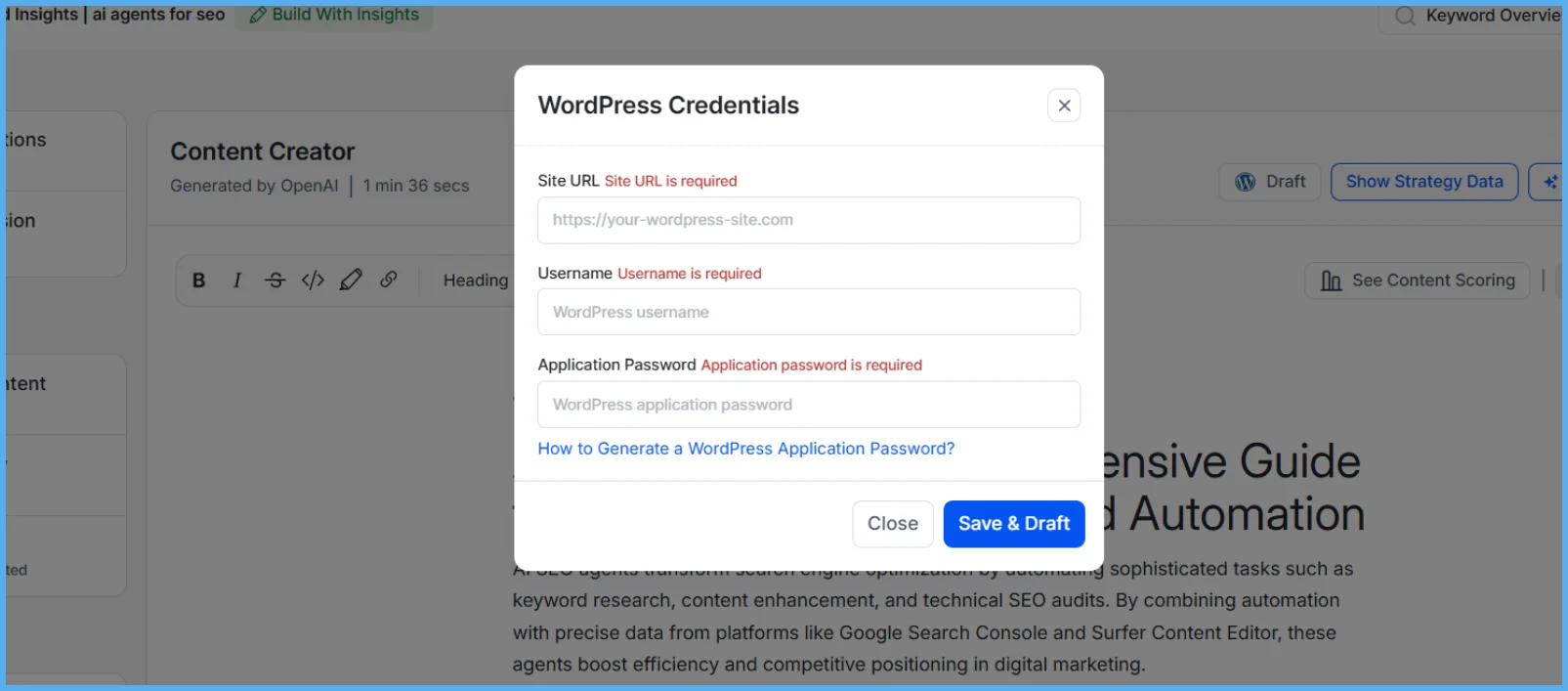
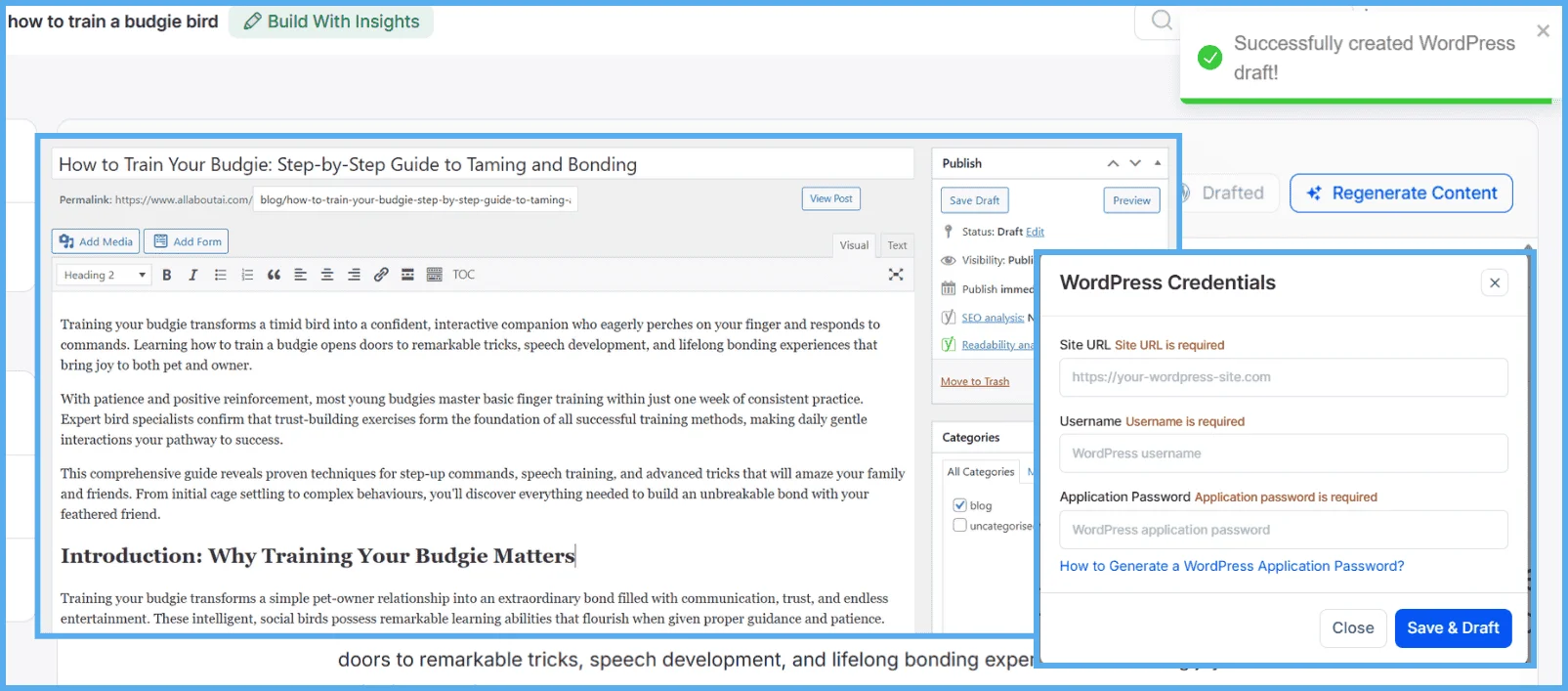
- Return to KIVA > WordPress Drafting.
- Paste the application password into the appropriate field.
- Enter the same username used to generate the password.
Confirm the WordPress site URL and integration.
4. Send Your Draft to WordPress
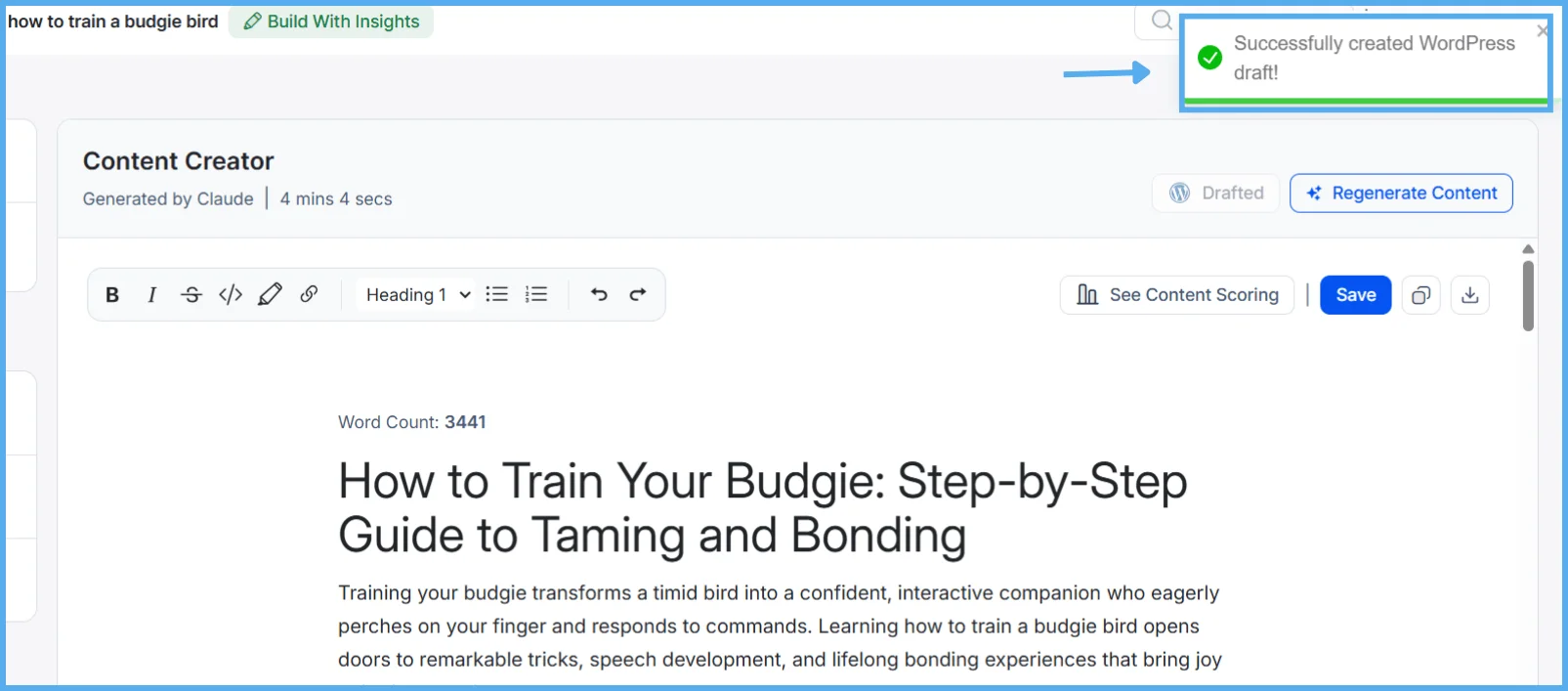
- In KIVA, click “Save & Draft”.
- Your content will be sent directly to your WordPress account as a draft.
5. View, Edit, and Finalize the Draft in WordPress
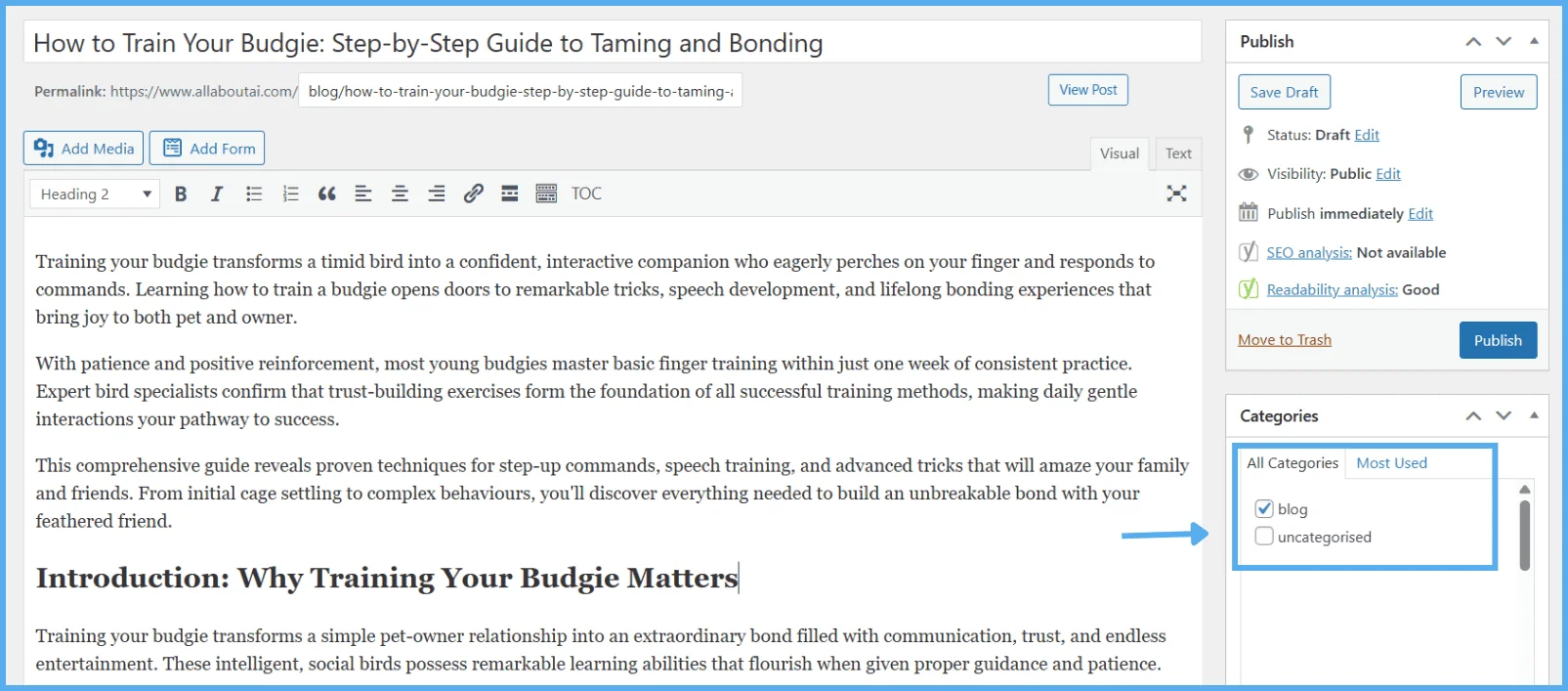
To finalize your KIVA-generated content, log in to your WordPress Admin panel and navigate to Posts > All Posts > Drafts. Locate your draft and click Edit to open it in the editor. Assign a category to the post to enable the preview function—without one, the preview may not work correctly. Optionally, you can also update the permalink (URL) to better reflect your content structure or SEO preferences.
7. Save and Publish
- After editing, click Save Draft to store changes.
- After final look you can click on Publish.
- Click View Post to open the published article on your site.
How KIVA Streamlines Publishing with WordPress Drafting
KIVA by Wellows, an AI SEO Agent, sends your SEO-optimized drafts directly to WordPress CMS—securely, instantly, and without tool-switching. It removes copy-pasting, formatting errors, and CMS toggling from modern SEO workflows.
| Publishing Step | Without KIVA | With KIVA WordPress Drafting | Benefits |
|---|---|---|---|
| Manual Drafting | Copy-paste from Google Docs or email to WordPress CMS | One-click Draft sends content directly to WordPress | Agencies report fewer errors and smoother formatting |
| Site Connection | Requires plugins or manual upload | Secure REST API + application password integration | Startups highlight faster setup with no extra tools |
| Access Control | Any user can publish posts without restriction | Only admin-level users with credentials can publish | Improved security trusted by consultants and agencies |
| Draft Preview | Categories and layout often lost during upload | Posts saved as editable drafts, categories intact | Freelancers note clean previews without rework |
| Final Publishing | Manual edits and multiple steps before publishing | KIVA handles the draft handoff—just hit Publish | One-click go-live cited by users as 10x faster |
KIVA’s WordPress Drafting takes AI-written content from finished to published—securely and in seconds.
KIVA Simplifies Publishing With One-Click WordPress Drafting
The WordPress Drafting feature sends your content straight from KIVA to your WordPress dashboard—securely, cleanly, and without switching tools. It’s designed to help every team move from creation to publication faster.
1. Agencies: Publish Smarter Across Multiple Clients
Managing content for multiple brands means different CMS logins, manual uploads, and version control issues. KIVA’s integrated WordPress Drafting cuts out the clutter and saves hours per week.
| The Challenges | How KIVA Helps |
|---|---|
| Multi-Site Publishing: Switching logins, formatting errors, copy-paste chaos. Lost Time: Teams spend hours prepping posts after creation. |
Connected Drafting: Save content directly to each WordPress site from KIVA. Frictionless Workflow: No broken layouts, no extra formatting. |
Agency teams using KIVA’s WordPress Drafting complete approvals faster and avoid formatting fixes.
Want every client post to go live flawlessly? The AI search visibility platform for agencies ensures consistency, accuracy, and performance across every brand you manage.
2. Startups: Go From Draft to Site—Fast
Startups can’t afford to waste time uploading and reformatting blog posts. With KIVA, your article lands in WordPress as a draft—fully formatted and ready to go live.
| The Challenges | How KIVA Helps |
|---|---|
| Speed-to-Market: Delays between content creation and publishing. Unstructured Process: Risk of skipping categories, formatting, or QA. |
One-Click Drafting: Posts go straight to WordPress drafts. Ready-to-Edit: Just assign a category and hit Publish. |
Startups using KIVA’s WordPress Drafting shorten go-to-market cycles with draft-ready posts in WordPress.
Want SEO content that’s fast to publish? See how the AI Search Visibility Platform for Startups helps teams accelerate content-to-live workflows →
3. Freelancers: Skip the Copy-Paste, Keep the Quality
For freelancers juggling multiple clients and tight deadlines, every minute matters. KIVA’s WordPress Drafting feature eliminates the repetitive copy-paste cycle, keeping your workflow fast, consistent, and error-free. Backed by the AI Search Visibility Platform for Freelancers it ensures smooth publishing without sacrificing structure or style.
| The Challenges | How KIVA Helps |
|---|---|
| Manual Publishing: Wastes time and breaks formatting. CMS Overload: Too many tabs, tools, and upload steps. |
Direct WordPress Integration: No more copy-pasting. Clean Drafts: Auto-transferred content with structure intact. |
Freelancers using KIVA’s WordPress Drafting save 70+ hours each month by skipping manual CMS prep.
Want to deliver fast, CMS-ready posts? See how KIVA helps Freelancers →
4. Marketing Consultants: Make Every Draft Client-Ready
Consultants need to show up with polished deliverables. KIVA lets you export full-length posts directly to your client’s CMS—structured, saved, and pitch-ready.
| The Challenges | How KIVA Helps |
|---|---|
| Manual Exporting: Requires extra tech setup or handoff time. Client Expectations: Need to deliver ready-to-review content. |
Seamless Site Connection: Save drafts straight to client WordPress sites. Faster Handoffs: Share preview links without technical delays. |
Marketing consultants using KIVA’s WordPress Drafting deliver client-ready drafts faster with seamless CMS integration.
Want to cut delays and impress clients sooner? See how the AI search visibility platform for consultants accelerates delivery while ensuring every piece is pitch-perfect.
What KIVA’s WordPress Drafting Feature Unlocks
Instantly send full-length articles from KIVA to your WordPress dashboard. No copy-paste, no plugin, and no formatting issues—just secure, structured, LLM-ready content published in one click.
Integrated Publishing in Action
Once your article is generated in KIVA, you can click “Draft” and publish directly to your connected WordPress site—saving time and preserving content structure.
- Secure API Connection: Uses WordPress application passwords to safely authenticate your account.
- Instant Drafting: Saves posts to your WordPress dashboard—fully formatted, with no copy-pasting.
- One-Click Export: Complete your draft in KIVA, push to WordPress, and finalize inside your CMS.
- No Plugins Needed: Built-in REST API support eliminates the need for external tools or add-ons.
Explore Features That Pair With WordPress Drafting
WordPress Drafting works seamlessly with these KIVA feature for a smooth end-to-end publishing experience:
Helpful Tools to Streamline WordPress Publishing
To ensure faster publishing and better formatting alignment, we recommend using:
- Keyword Research Checklist – Help organize and prepare content titles, tags, and meta descriptions before posting.
- LLM Pattern Recognition Checklist – Optimize tone, structure, and link formatting for better performance on both AI models and SERPs.
Use these tools to clean up your content pipeline and maintain clarity between content creation and publishing.
Recap: Why WordPress Drafting Completes the KIVA Workflow
You’ve generated AI-aligned content—now it’s time to publish. WordPress Drafting gives you the final push without the publishing hassle.
- Securely connect any WordPress site to KIVA in minutes
- Send generated drafts directly to your WordPress dashboard
- Skip manual uploads, formatting edits, and tool switching
- Publish faster with structured, SEO-ready, LLM-visible content
With KIVA’s WordPress Drafting, your content is one click away from publish-ready.
FAQs
KIVA by Wellows, an AI SEO Agent, sends content from the Content Creator to WordPress as a Draft via the REST API. Your structure, headings, and SEO formatting are preserved—no copy-pasting.
Faster publishing, preserved formatting, and fewer workflow steps. Secure integration via application passwords; no plugins required.
Yes. KIVA drafts appear in WordPress and work with plugins like Yoast and Rank Math.
It’s a KIVA feature that pushes long-form content straight into WordPress as editable Drafts. Add categories, tags, and finalize in your CMS.
Content Brief Generator, Content Creator, Social Discussion Detector, Brand Guidelines, and User Intent Analysis—streamlining planning through publish.
Yes. Once in Draft, your team can review, edit, and approve natively in WordPress.
The Quick Draft widget on the WordPress dashboard allows you to quickly jot down ideas and save them as drafts. Simply enter a title and content, then click “Save Draft.” ([wpmudev.com](https://wpmudev.com/project/quick-press/?utm_source=openai))
Yes. Once content is pushed as a Draft via KIVA, your team can review, edit, and approve natively in WordPress.